
Name-Based Case Searches
For District and Justice Court records, paid public case history runs through Utah Courts Xchange. First choose District Court, Justice Court, or both. Then decide whether you want all court cases or judgments entered. After that, set the scope to statewide, Salt Lake County, or a single court. A county-wide scope helps with common names. If a notice names the exact court, use it. That is the more precise route for a docket search.
- Open Xchange and choose the guest or account path.
- Select jurisdiction, search type, and Salt Lake County or the correct court as scope.
- Enter the last name or company name, then the first name as filed. Use first letters plus * to narrow a person’s first name.
- Add case type, filing or disposition dates, birth date where lawful and needed, or citation location.
- Open a likely result and read Case History/Documents, then verify it with the holding court.
Put a business name in the Last Name/Company field. Xchange returns no more than 500 matches, so a broad query can come back incomplete. Narrow with the court, case type, or date range instead of trusting the first list to hold every Salt Lake County case.
Salt Lake County Xchange Search Fields
The official help lays the fields out in a set order. Most act as optional filters. A useful court docket search still needs at least a case number, a name, or citation information. Case and citation numbers are not unique statewide, which is why jurisdiction and location matter.
| Field label | Type | Required | Use |
|---|---|---|---|
| Jurisdiction | Dropdown | Choose | District, Justice, or both |
| Search Type | Dropdown | Choose | All cases or judgments entered |
| Case Number | Text | No | Add county or court because numbers are not statewide unique |
| Last Name/Company | Text | No | Enter as filed; business names use this field |
| First Name | Text | No | Use a partial first name with wildcard where accepted |
| Case Type | Dropdown | No | Narrow criminal, civil, domestic, probate, or other results |
| Search Scope | Dropdown | No | Statewide, Salt Lake County, or one court |
| Citation | Text and location | No | Pair the number with citation location |
| Date Range | Expanded panel | No | Filter filings, dispositions, judgments, or judgment dispositions |
The Xchange help page documents these controls and narrowing tips.
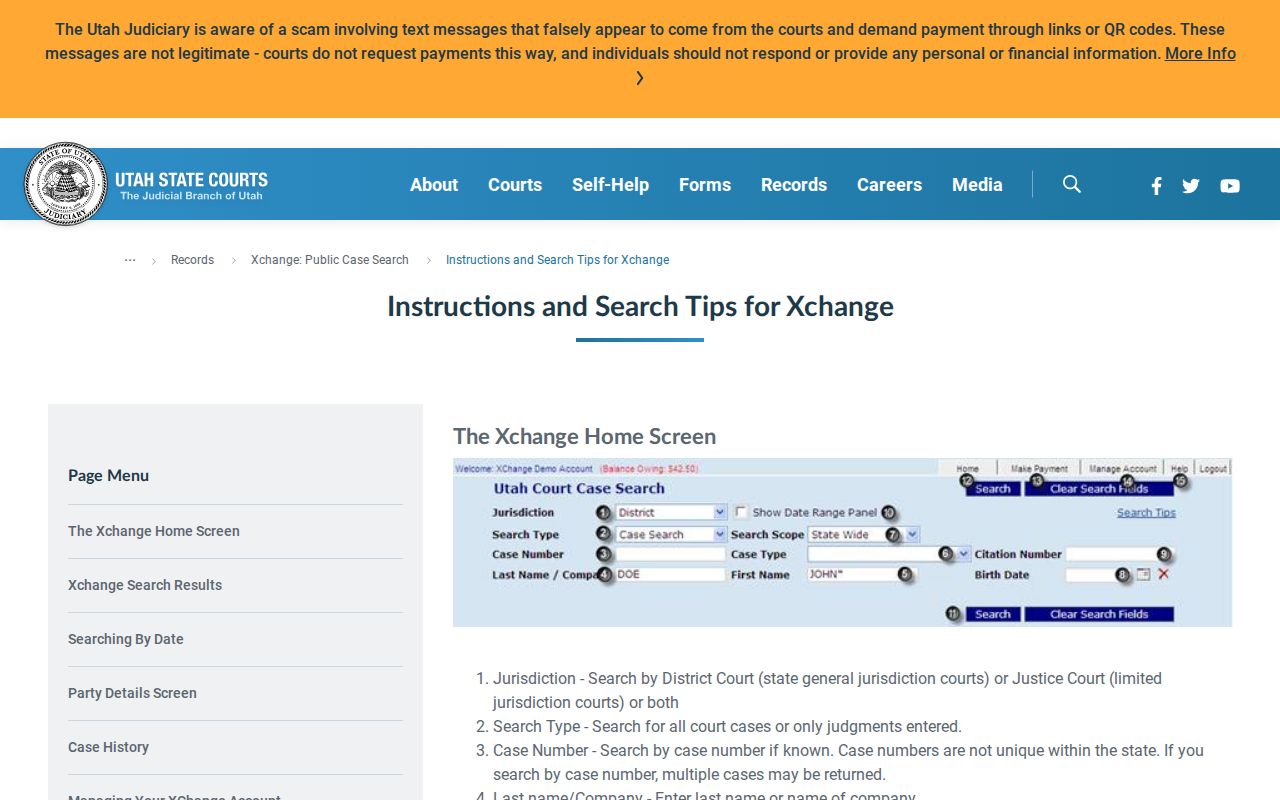
The interface itself shows why a location filter belongs in a sound Salt Lake County docket search. Treat it as a core step, not an afterthought.
Case Number Searches
A complete case number is the most direct key to a docket. The first two digits generally give the filing year. Even so, case numbers are not unique statewide. A number like 26-12345 shows the structure only; it is not a real case. Pair the number with Salt Lake County, the court level, or the exact court location.
If a direct number search fails, strip stray spaces or punctuation only as the official help allows. Then confirm the number from the citation or notice. Do not guess a court from the offense or claim alone. Justice Court, District Court, Juvenile Court, and federal court identifiers sit in separate systems. Each carries separate access rules.
Need a court date rather than the full case trail? Use the Salt Lake County court schedule. That lookup accepts a case number, party, judge, attorney, date, and location.
Salt Lake County Xchange Entry Paths
Xchange offers guest entry, account setup, login, payment, and help screens. A guest session is temporary. It can last up to 24 hours, may end after 30 idle minutes, and unused funds can be lost at expiration. An account suits repeated public research. A guest path fits a one-time case lookup. The official Xchange landing screen displays each of these choices.
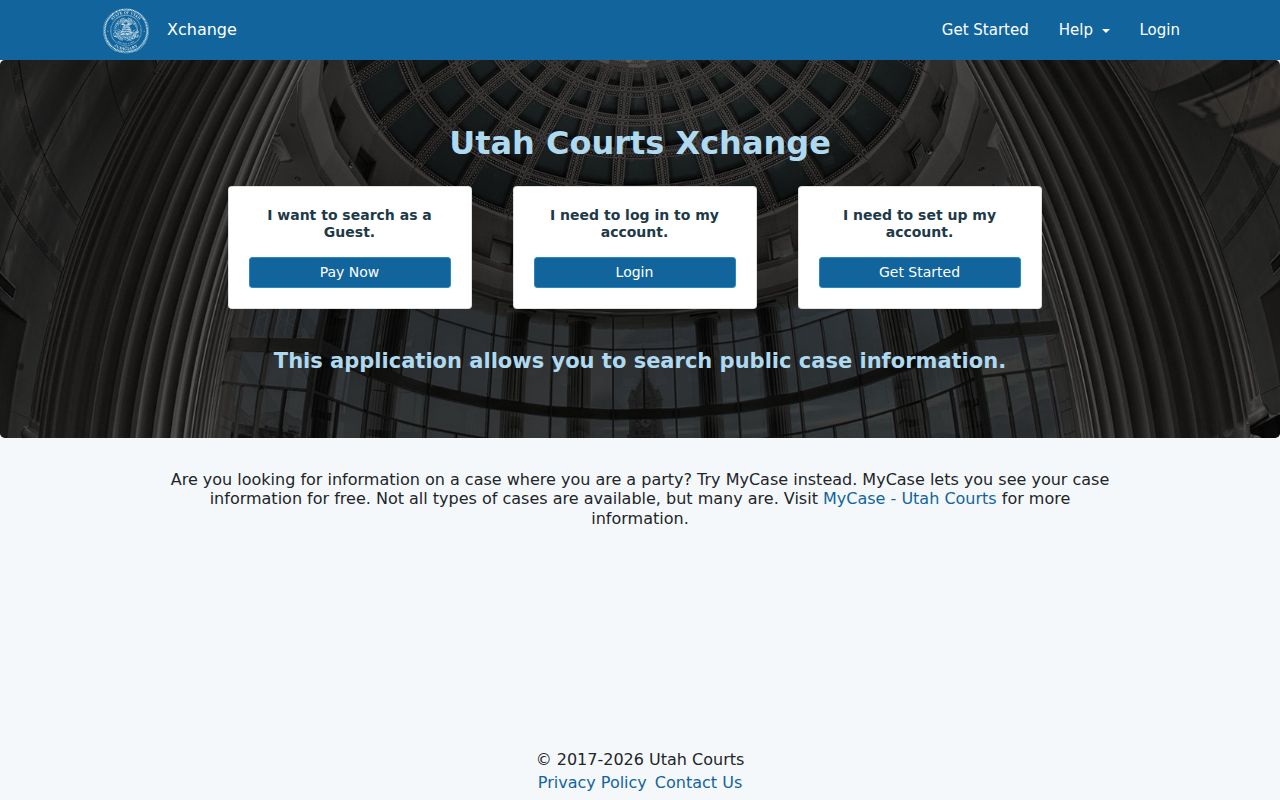
The entry screen labels Xchange as public case information. It is not Utah Courts District Court eFiling, the tool for filing papers, and it is not MyCase, which serves a party's own linked matters. The registration screen shows the account and guest controls.
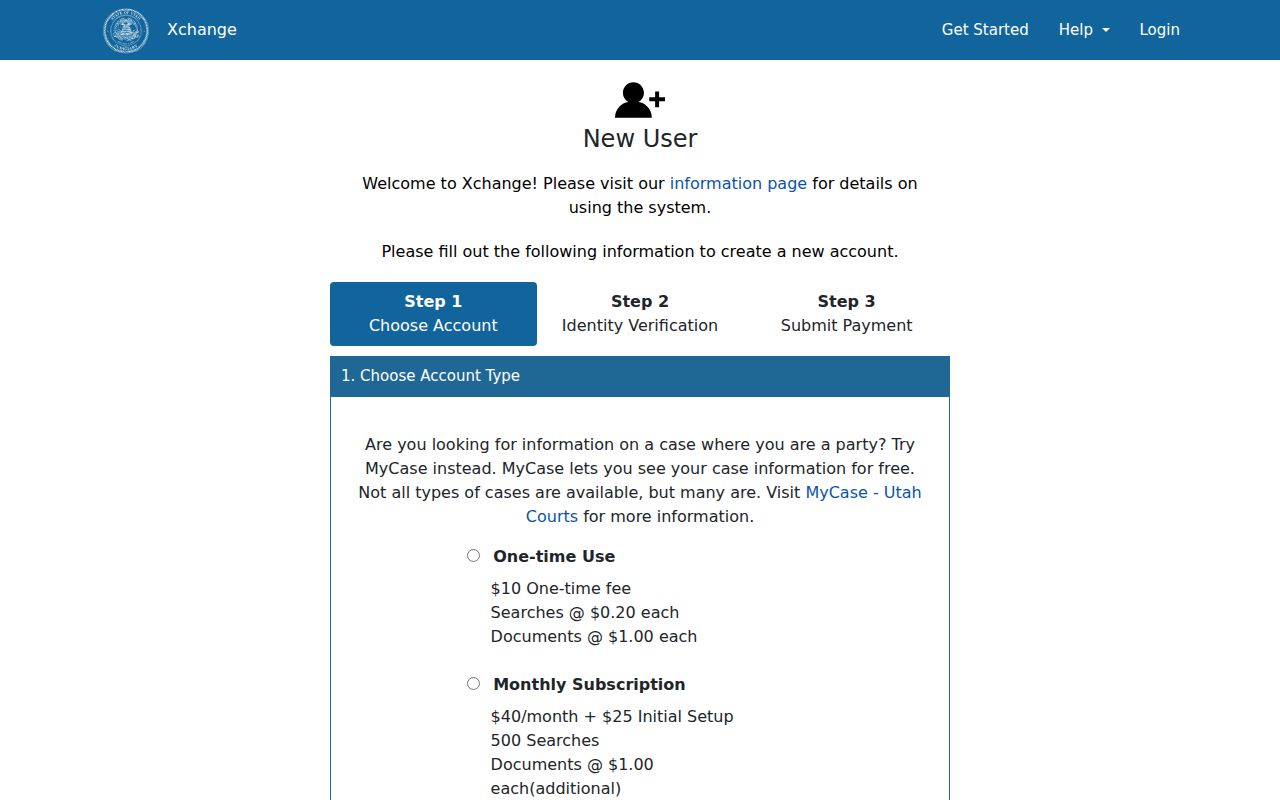
Registration uses email verification and payment controls. Keep credentials private. No public researcher needs another person's MyCase password, identity document, or verification code.
Case Search Results Explained
A Salt Lake County search result row identifies the court record. The expanded case history adds the chronology. Clicking the case-number link opens that history; it does not download a filing. Document availability and document charges sit apart from the search charge itself. Those are two different costs.
| County and Court | Salt Lake County and the District or Justice Court location holding the file. |
|---|---|
| Case Type | The court’s category, such as State Felony, civil, probate, small claims, Other Misdemeanor, or Traffic Court Case. |
| Case Number | The court identifier used with its location; it opens expanded history. |
| Filing Date | The date the case entered the court record. |
| Parties and Codes | Names and roles such as PLA, DEF, PET, RES, INT, or GAL where public. |
| Case History | Proceedings, filings, hearings, judgments, dispositions, documents, and other public entries. |
| Document Status | Whether a public electronic item is available; absence does not mean the paper does not exist. |
Read charges, claims, pleas, judgments, and dispositions as separate fields in a court docket. A filed charge is not a conviction. A calendar setting is not a ruling. Check codes against the full case history and the official code list.
Salt Lake County Search Costs
Xchange charges for remote access. Its two price listings disagreed in September 2026. The published page said $0.35 per one-time search, while the live registration screen said $0.20 and described a $10 balance that covers searches and documents. One of those rates has to be wrong. So check the live screen before you pay anything.
The official subscription and fee page lays out guest pricing and account pricing side by side.
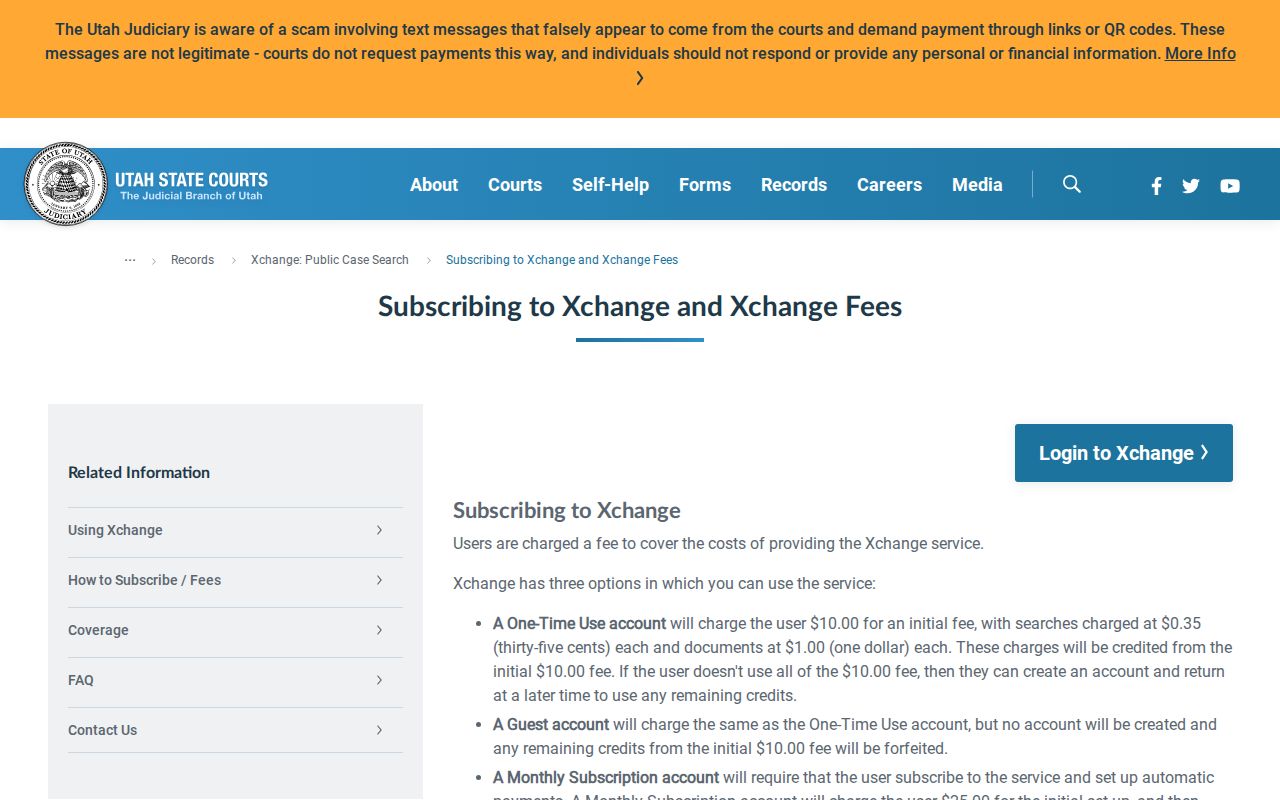
The published monthly plan carries a $25 setup fee and a $40 monthly charge with 500 searches included. Added searches are listed at $0.35. Public electronic documents remain $1 each. These are Xchange fees, not certified-copy charges from a clerk. Pricing can change. The live checkout amount should control the decision to fund a temporary guest session.
Two Ways to Search: County and State
Utah runs no separate Salt Lake County case portal for state court case history. Nothing replaces Xchange there. The same service scopes statewide, by county, or by a single court. The real choice is between a wide statewide query and a local filter. Narrow it to Salt Lake County or to one court. Pick based on how broad your case lookup needs to be.
| Search choice | Coverage | Best use |
|---|---|---|
| Statewide Xchange scope | Participating public District and Justice Court history across Utah | A person or case that may involve more than one county |
| Salt Lake County scope | Public results assigned to the county | A known local matter when the exact court is unclear |
| Particular-court scope | One District or Justice Court location | A citation or notice that names the court |
Federal cases sit outside all three choices and run through PACER. Juvenile records are not an ordinary Xchange target either. Identify the court level first, then pick the system.
Salt Lake County Xchange or MyCase
Two tools cover Salt Lake County case lookup, and each serves a different person. Xchange is the paid tool for searching public case history across the court docket. Parties who want free access to their own papers, payments, linked cases, and notifications should use MyCase instead.
| Channel | User | What it does |
|---|---|---|
| Xchange | Public researcher | Paid public District and Justice Court case history and available documents |
| MyCase | Party in the case | Free linked-case history, papers, payments, and notices |
| Courthouse terminal | Public visitor | Free public CORIS/Xchange access where offered |
| Holding clerk | Requester | Inspection, copies, certified records, and access routing |
You can also search the docket in person. Public terminals sit at District Court locations. Some Justice Courts plus the State Law Library may have them too. Ask the clerk about the rules for terminals and documents before you start. When an online document is missing, send the Utah Judiciary written record request. Address it to the clerk who holds it. Each court handles mail, email, fax, counter, and drop-box delivery a bit differently.
Salt Lake County Filing Is Separate
Utah Courts District Court eFiling handles filings only. It is not a docket search tool for the public. You need an account, and the system works through electronic filing service providers. Once something is filed, public users can track down eligible Salt Lake County case history or documents through Xchange. Parties to a case use their own case access instead. Redaction is the filer's job. Personal identifiers must be marked out, and the right document type must be chosen. Court staff will not necessarily catch every privacy slip before a filing goes public. A wrong-document or redaction problem runs through the clerk. It never runs through a public search account. The workflow stays simple. Pull the case history in Xchange first. Read the document title and the availability flag. Then buy an available public document if you need it. Or send a specific written request to the right clerk. Certified and exemplified copies are priced under the judiciary fee schedule. That price is not the Xchange document price.
Which Cases Stay Restricted
UCJA Rule 4-202.02 presumes court records are public, then sorts the exceptions. Private, protected, sealed, and restricted material each carry their own limits. Domestic relations, guardianship, protective-order, juvenile, and personal-identifier records are the categories most likely to be held back, and UCJA Rule 4-205 pulls computer and index access after a sealing or expungement.
No result has several meanings. A Salt Lake County matter may be outside the search scope, filed under another court, not yet posted, unavailable electronically, sealed, expunged, juvenile, or federal.
Xchange is not a route around a restriction. A person seeking nonpublic material generally must show entitlement through the proper motion, petition, rule, or court order.
Missing public paper? Turn to the Utah court record request process. Send a written request to the clerk holding the record, naming the court, the case number if known, the record type, the date range, the caption, and the form you want. County or city administrative records may fall under GRAMA. Judiciary case records do not; they follow Utah's court rules.